# Lens Desktop Login error please try again later
**URL:** https://forums.k8slens.dev/t/lens-desktop-login-error-please-try-again-later/3157
**Category:** Lens Support & Troubleshooting
**Created:** [April 11, 2024, 11:09am UTC](https://forums.k8slens.dev/t/lens-desktop-login-error-please-try-again-later/3157 "2024-04-11T11:09:43Z")
**Posts on this page:** 20
**Page:** 1
### Author:  [@panwadx](https://forums.k8slens.dev/u/panwadx)
#### Post date: [April 11, 2024, 11:09am UTC](https://forums.k8slens.dev/t/lens-desktop-login-error-please-try-again-later/3157/1 "2024-04-11T11:09:43Z")
Hello All,
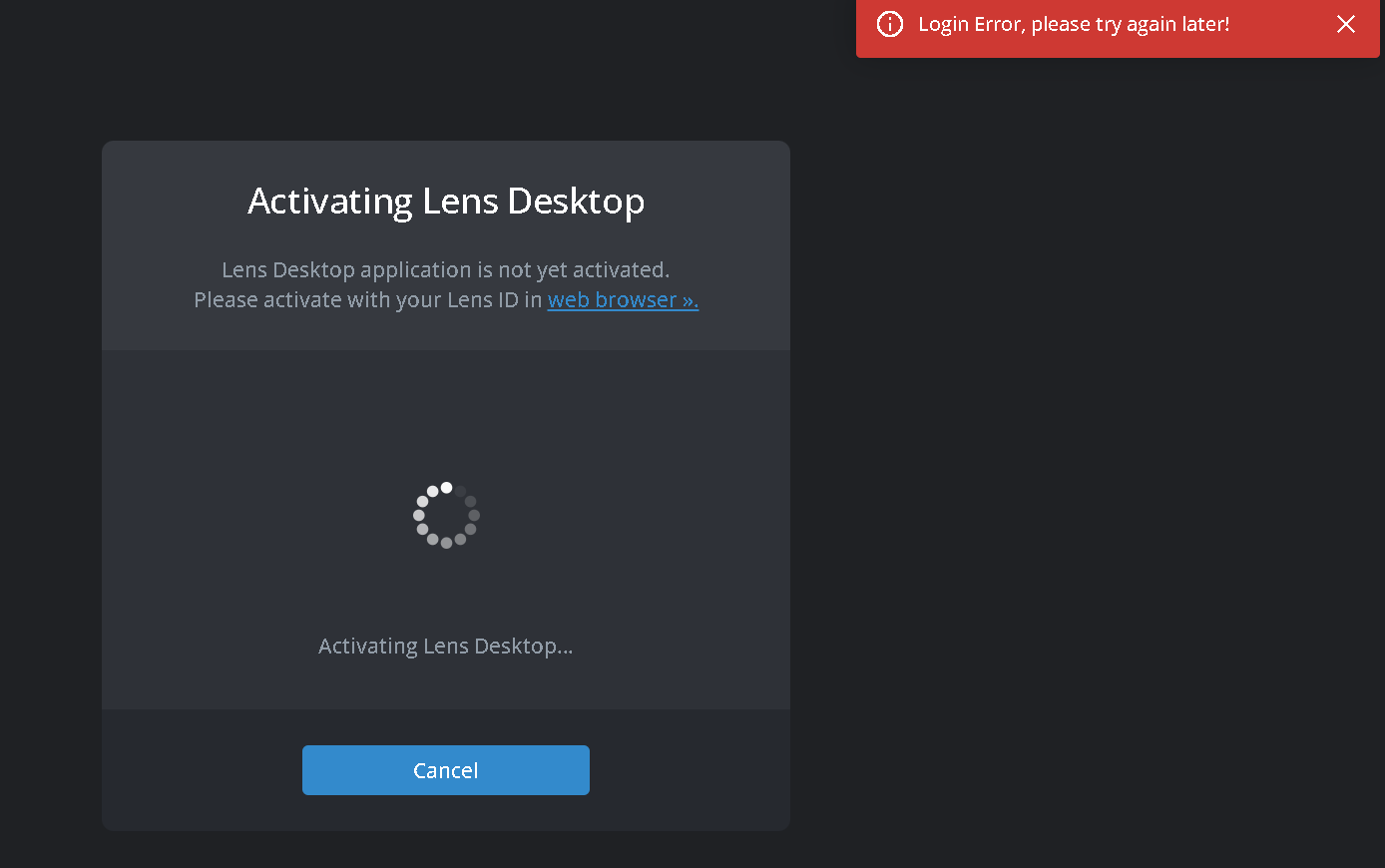
Could someone help me with the lens desktop activation as i have lens personal subscription but when i try to activate the lens desktop it gave me error " Login error please try again later".
Also it redirect me to the browser (Chrome) and then back to Lens desktop and gave above error message after that it went into the loop for 3 or 4 time and give error.
---
### Author:  [@tkudinov](https://forums.k8slens.dev/u/tkudinov)
#### Post date: [April 15, 2024, 10:05am UTC](https://forums.k8slens.dev/t/lens-desktop-login-error-please-try-again-later/3157/2 "2024-04-15T10:05:33Z")
Hello panwadx,
Thank you for reaching out to Lens support!
Could you check this allowlist, maybe some ports are closed for you, please?
[Redirecting...](https://docs.k8slens.dev/lens-id/ip-allowlist/)
We are waiting for your reply.
Best Regards,
Tikhon Kudinov
Lens Support Engineer
Mirantis, Inc
---
### Author:  [@panwadx](https://forums.k8slens.dev/u/panwadx)
#### Post date: [April 15, 2024, 6:35pm UTC](https://forums.k8slens.dev/t/lens-desktop-login-error-please-try-again-later/3157/3 "2024-04-15T18:35:07Z")
Hello Tikhon Kudinov,
Everytime a new port has been assigned to the lens desktop and always got login error, please try again later. All my colleague has been using the lens desktop without any issue but only me getting this error. I cleared the cache, browser history everything restarted the pc but still same issue. When i tried on my personnel laptop it works perfectly fine. But on work pc its not working.
---
### Author:  [@tkudinov](https://forums.k8slens.dev/u/tkudinov)
#### Post date: [April 16, 2024, 9:50am UTC](https://forums.k8slens.dev/t/lens-desktop-login-error-please-try-again-later/3157/4 "2024-04-16T09:50:40Z")
Hello panwadx,
Thank you for the information!
What version of Lens do you use? If it’s not the latest one, could you download it and try to log in again, please?
We are waiting for your reply.
Best Regards,
Tikhon Kudinov
Lens Support Engineer
Mirantis, Inc
---
### Author:  [@panwadx](https://forums.k8slens.dev/u/panwadx)
#### Post date: [April 16, 2024, 10:08am UTC](https://forums.k8slens.dev/t/lens-desktop-login-error-please-try-again-later/3157/5 "2024-04-16T10:08:10Z")
Hello Tikhon Kudinov,
I am using the latest version (Lens+Setup+2024.3.271133-latest.exe) of lens and i have downloaded the same from the link provided by the lens ID itself. Also i have uninstall install the lens desktop 2 3 times as well but not success.
Please help
---
### Author:  [@tkudinov](https://forums.k8slens.dev/u/tkudinov)
#### Post date: [April 16, 2024, 12:16pm UTC](https://forums.k8slens.dev/t/lens-desktop-login-error-please-try-again-later/3157/6 "2024-04-16T12:16:15Z")
Hello panwadx,
Could you try to login again and after that provide us with the logs, please?
To do it you can click “Export support logs”, this button will appear when you click on the support button at the bottom of Lens.
You can paste the logs here as a text or you can send it to our email address [support@k8slens.dev](mailto:support@k8slens.dev)
We are waiting for your reply.
Best Regards,
Tikhon Kudinov
Lens Support Engineer
Mirantis, Inc
---
### Author:  [@panwadx](https://forums.k8slens.dev/u/panwadx)
#### Post date: [April 16, 2024, 12:39pm UTC](https://forums.k8slens.dev/t/lens-desktop-login-error-please-try-again-later/3157/7 "2024-04-16T12:39:39Z")
Hello Tikhon Kudinov,
Thank you for your reply as i see the support option is disabled for me. Is there any alternate way to check like anywhere it log the error or something. Because i am unable to see any error logs
---
### Author:  [@tkudinov](https://forums.k8slens.dev/u/tkudinov)
#### Post date: [April 16, 2024, 12:47pm UTC](https://forums.k8slens.dev/t/lens-desktop-login-error-please-try-again-later/3157/8 "2024-04-16T12:47:57Z")
Hello panwadx,
You can try to extract logs from the “Help” section → “Extract support logs”.
We are waiting for your reply.
Best Regards,
Tikhon Kudinov
Lens Support Engineer
Mirantis, Inc
---
### Author:  [@panwadx](https://forums.k8slens.dev/u/panwadx)
#### Post date: [April 24, 2024, 1:10pm UTC](https://forums.k8slens.dev/t/lens-desktop-login-error-please-try-again-later/3157/9 "2024-04-24T13:10:46Z")
Hello Tikhon,
I dont find any help section…support is disabled and i am not sure why this is happening. This is a very frequent issue which is happening with the lens desktop and so many user are facing the same issue but unfortunately the lens support is not able to provide any support or doc to resolve this.
I even engaged my IT team to look into the issue but they also unable to resolve the issue.
---
### Author:  [@velengurasp](https://forums.k8slens.dev/u/velengurasp)
#### Post date: [April 29, 2024, 8:56pm UTC](https://forums.k8slens.dev/t/lens-desktop-login-error-please-try-again-later/3157/10 "2024-04-29T20:56:55Z")
Hi! I have similar error.
Before installation i registered account “Lens personal”.
Details:
OS: Windows 11
Installed version: Lens Setup 2024.4.230844-latest
Browser: Chrome & Edge (I tried both browsers).
1. I launched the application using the desktop icon.
2. Activation Lens Desktop window appears.
3. Default browser with auth form launched.
4. I unputed correct login and password (I can’t add two images).
5. Browser sent info into application.
6. App showed error message.
---
### Author:  [@tkudinov](https://forums.k8slens.dev/u/tkudinov)
#### Post date: [May 7, 2024, 8:05am UTC](https://forums.k8slens.dev/t/lens-desktop-login-error-please-try-again-later/3157/11 "2024-05-07T08:05:51Z")
Hello,
Could you try to first log into [Lens ID portal](https://app.k8slens.dev/signin) and after successfully logging in click on “Lens Desktop”. It should redirect you to the Lens Desktop with your credentials.
We are waiting for your reply.
Best Regards,
Tikhon Kudinov
Lens Support Engineer
Mirantis, Inc
---
### Author:  [@nevalla](https://forums.k8slens.dev/u/nevalla)
#### Post date: [May 7, 2024, 12:38pm UTC](https://forums.k8slens.dev/t/lens-desktop-login-error-please-try-again-later/3157/12 "2024-05-07T12:38:47Z")
Hi,
It seems that proxy settings are not passed properly to service component that is doing the login on Lens Desktop and that’s why Lens is not able to request the auth server. We will try to reproduce this and fix this issue as soon as possible.
---
### Author:  [@vnguyen](https://forums.k8slens.dev/u/vnguyen)
#### Post date: [July 4, 2024, 5:18pm UTC](https://forums.k8slens.dev/t/lens-desktop-login-error-please-try-again-later/3157/13 "2024-07-04T17:18:07Z")
Hi nevalla,
is this fixed in the latest version? I am still experiencing these issues as mentioned by the original poster.
---
### Author:  [@kamal2024](https://forums.k8slens.dev/u/kamal2024)
#### Post date: [July 12, 2024, 5:40am UTC](https://forums.k8slens.dev/t/lens-desktop-login-error-please-try-again-later/3157/14 "2024-07-12T05:40:32Z")
+1 , I am also facing this issue with latest binary available on your portal.
---
### Author:  [@yacine-1](https://forums.k8slens.dev/u/yacine-1)
#### Post date: [August 23, 2024, 6:32am UTC](https://forums.k8slens.dev/t/lens-desktop-login-error-please-try-again-later/3157/15 "2024-08-23T06:32:01Z")
Same. No matter the version of Lens, I can no longer connect. It worked fine before.
---
### Author:  [@tkudinov](https://forums.k8slens.dev/u/tkudinov)
#### Post date: [September 4, 2024, 9:22am UTC](https://forums.k8slens.dev/t/lens-desktop-login-error-please-try-again-later/3157/16 "2024-09-04T09:22:58Z")
Hello yacine-1,
That error can be caused by multiple different reasons. The fix has been released more than a month ago.
Please check the logs to understand the cause of the issue.
Here are where you can find the logs:
- MacOS: ~/Library/Logs/Lens/
- Windows: %USERPROFILE%\AppData\Roaming\Lens\logs\
- Linux: ~/.config/Lens/logs/
Best Regards,
Tikhon Kudinov
Lens Support Engineer
Mirantis, Inc
---
### Author:  [@yacine-1](https://forums.k8slens.dev/u/yacine-1)
#### Post date: [September 4, 2024, 12:02pm UTC](https://forums.k8slens.dev/t/lens-desktop-login-error-please-try-again-later/3157/17 "2024-09-04T12:02:42Z")
Hello,
The k8slens(.)dev domain is blocked by my company.
I usually go through a proxy but I don’t have the possibility to define it in Lens before connecting. The preference window does not want to open until I have connected with my Lens ID.
In the logs, I see several requests blocked by the firewall to downloads(.)k8slens(.)dev/ide/latest.yml
I am on Lens 2024.8.291605
---
### Author:  [@tkudinov](https://forums.k8slens.dev/u/tkudinov)
#### Post date: [September 12, 2024, 10:12am UTC](https://forums.k8slens.dev/t/lens-desktop-login-error-please-try-again-later/3157/18 "2024-09-12T10:12:59Z")
Hello yacine-1,
So, this is the main reason for the issue.
Did you check the allow list? if not, here it is: [Redirecting...](https://docs.k8slens.dev/lens-id/ip-allowlist/?h=allow)
Best Regards,
Tikhon Kudinov
Lens Support Engineer
Mirantis, Inc
---
### Author:  [@yacine-1](https://forums.k8slens.dev/u/yacine-1)
#### Post date: [September 12, 2024, 1:57pm UTC](https://forums.k8slens.dev/t/lens-desktop-login-error-please-try-again-later/3157/19 "2024-09-12T13:57:26Z")
Hello,
I asked my company to authorize K8SLens DNS domains and it works again.
However, this does not solve the problem at its root. It is necessary to be able to really configure the proxy from the first start of the application.
If my company had refused my DNS authorization request, using the proxy would be the only solution.
Best regards.
---
### Author:  [@denisbondaletov](https://forums.k8slens.dev/u/denisbondaletov)
#### Post date: [April 1, 2025, 10:09am UTC](https://forums.k8slens.dev/t/lens-desktop-login-error-please-try-again-later/3157/20 "2025-04-01T10:09:23Z")
Solution: [GitHub - freelensapp/freelens: Free IDE for Kubernetes](https://github.com/freelensapp/freelens)
[Next page](https://forums.k8slens.dev/t/lens-desktop-login-error-please-try-again-later/3157.md?page=2)