# Lens network usage
**URL:** https://forums.k8slens.dev/t/lens-network-usage/5750
**Category:** Lens Support & Troubleshooting
**Created:** [March 19, 2025, 2:15pm UTC](https://forums.k8slens.dev/t/lens-network-usage/5750 "2025-03-19T14:15:13Z")
**Posts on this page:** 5
**Page:** 1
### Author:  [@andrey.te](https://forums.k8slens.dev/u/andrey.te)
#### Post date: [March 19, 2025, 2:15pm UTC](https://forums.k8slens.dev/t/lens-network-usage/5750/1 "2025-03-19T14:15:13Z")
I encountered a problem with high cpu and network usage.
No terminal windows are open. Only tab workload → pods.
After some time, Lens starts consuming network resources. Then the load decreases and increases again. This continues until you close the tab.
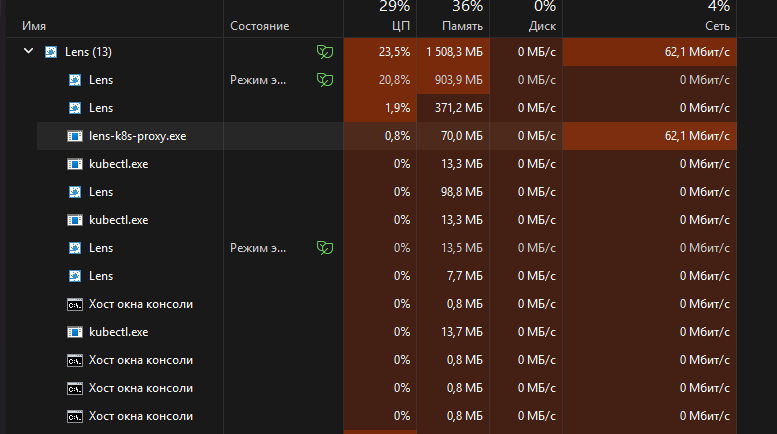
Any ideas how to fix this?
---
### Author:  [@cvdlinden](https://forums.k8slens.dev/u/cvdlinden)
#### Post date: [March 20, 2025, 10:00am UTC](https://forums.k8slens.dev/t/lens-network-usage/5750/2 "2025-03-20T10:00:17Z")
Hello @andrey.te , thank you for reaching out! I have contacted our development team regarding your issue.
---
### Author:  [@tkudinov](https://forums.k8slens.dev/u/tkudinov)
#### Post date: [March 24, 2025, 11:08am UTC](https://forums.k8slens.dev/t/lens-network-usage/5750/3 "2025-03-24T11:08:33Z")
Hello @andrey.te,
We have tried to reproduce this issue. We have opened a lot of tabs, but couldn’t get the issue as you got.
Could you try to update Lens, please?
Best Regards,
Tikhon Kudinov
Lens Support Engineer
Mirantis, Inc
---
### Author:  [@andrey.te](https://forums.k8slens.dev/u/andrey.te)
#### Post date: [March 25, 2025, 12:47pm UTC](https://forums.k8slens.dev/t/lens-network-usage/5750/4 "2025-03-25T12:47:28Z")
hello, Tikhon,
I use latest version of lens. As I said I have the only tab opened - list of pods;
Actually I have a lot of pods (it varies from 550 to 700) in 5 checked namespaces. I’ve just watched pods list and task manager, and I see network load increases up to 20mbit/s when number of pods (jobs are started) increases, and decreases when jobs are done and items count.
I’ll try to catch the moment when network reaches 70-90mbit/s
---
### Author:  [@crothmann](https://forums.k8slens.dev/u/crothmann)
#### Post date: [March 27, 2025, 8:23am UTC](https://forums.k8slens.dev/t/lens-network-usage/5750/5 "2025-03-27T08:23:49Z")
Thanks for reporting the issue @andrey.te! If you have a metrics server running, check the network usage with: `kubectl top pod --all-namespaces --sort-by=NETWORK `. If the results differ, please record a short performance video (devtools) and send it to **support@k8slens.dev** for analysis.
Let us know what you find!