# Lens stuck in loading screen in mac
**URL:** https://forums.k8slens.dev/t/lens-stuck-in-loading-screen-in-mac/6261
**Category:** Lens Support & Troubleshooting
**Tags:** macos, lens-desktop
**Created:** [July 29, 2025, 7:23am UTC](https://forums.k8slens.dev/t/lens-stuck-in-loading-screen-in-mac/6261 "2025-07-29T07:23:26Z")
**Posts on this page:** 8
**Page:** 1
### Author:  [@yeluri.krishnavamsi](https://forums.k8slens.dev/u/yeluri.krishnavamsi)
#### Post date: [July 29, 2025, 7:23am UTC](https://forums.k8slens.dev/t/lens-stuck-in-loading-screen-in-mac/6261/1 "2025-07-29T07:23:27Z")

---
### Author:  [@okoshevka](https://forums.k8slens.dev/u/okoshevka)
#### Post date: [July 30, 2025, 10:03am UTC](https://forums.k8slens.dev/t/lens-stuck-in-loading-screen-in-mac/6261/2 "2025-07-30T10:03:04Z")
Hi @yeluri.krishnavamsi
May I ask you to share more details, e.g. your current version of Lens?
Did you try to reinstall Lens from scratch?
---
### Author:  [@dragonking12235](https://forums.k8slens.dev/u/dragonking12235)
#### Post date: [August 4, 2025, 5:40am UTC](https://forums.k8slens.dev/t/lens-stuck-in-loading-screen-in-mac/6261/3 "2025-08-04T05:40:59Z")
I have a similar problem
macbook pro m4 stuck at the stage of loading the lens application, tried to install via brew and the official website, but nothing helped
---
### Author:  [@yeluri.krishnavamsi](https://forums.k8slens.dev/u/yeluri.krishnavamsi)
#### Post date: [August 4, 2025, 5:41am UTC](https://forums.k8slens.dev/t/lens-stuck-in-loading-screen-in-mac/6261/4 "2025-08-04T05:41:01Z")
Yes, I tried re-installing lens from scratch twice. I even deleted my kube config before re-installation. But same issue.
Pasting the logs below
---
### Author:  [@yeluri.krishnavamsi](https://forums.k8slens.dev/u/yeluri.krishnavamsi)
#### Post date: [August 4, 2025, 5:41am UTC](https://forums.k8slens.dev/t/lens-stuck-in-loading-screen-in-mac/6261/5 "2025-08-04T05:41:33Z")
Version = 2025.6.261308-latest
2025-07-31T10:18:20.525Z info: [CREATE-ELECTRON-WINDOW]: Loading content for window “splash” from file: /Applications/Lens.app/Contents/Resources/app.asar/static/splash.html…
2025-07-31T10:18:20.532Z info: [RUN-MANY-PERFORMANCE-LOGGING]: Running runnables for “after-window-is-opened” took 8.46 ms.
Individual runnables took:
- lens-core-main:show-dock-for-first-opened-window 3.78 ms
2025-07-31T10:18:20.728Z info: [CREATE-ELECTRON-WINDOW]: Window “splash” loaded
2025-07-31T10:18:20.747Z info: [CREATE-ELECTRON-WINDOW]: Loading content for window “first-application-window” from url: [https://lens.app:49654](https://lens.app:49654)…
2025-07-31T10:18:20.754Z info: [RUN-MANY-PERFORMANCE-LOGGING]: Running runnables for “after-window-is-opened” took 8.81 ms.
Individual runnables took:
- lens-core-main:show-dock-for-first-opened-window 3.48 ms
2025-07-31T10:18:20.889Z error: [CREATE-ELECTRON-WINDOW]: Failed to load window “first-application-window” { code: -102, desc: ‘ERR\_CONNECTION\_REFUSED’ }
2025-07-31T10:18:20.966Z info: [CREATE-ELECTRON-WINDOW]: Window “first-application-window” loaded
2025-07-31T10:18:20.969Z error: [LOGGER]: Error resolving proxy Object has been destroyed
2025-07-31T10:18:36.008Z warn: [RUN-MANY-OF-SLOW-RUNNABLES]: Slow runnable encountered: “application-for-electron-main:closing-of-application” (on-quit-of-back-end)
2025-07-31T10:18:36.011Z error: [LOGGER]: Error resolving proxy Object has been destroyed
2025-07-31T10:18:44.512Z info: APP:ACTIVATE { hasVisibleWindows: true }
2025-07-31T10:19:07.355Z error: [LOGGER]: Error resolving proxy Object has been destroyed
2025-07-31T10:21:36.787Z info: APP:ACTIVATE { hasVisibleWindows: true }
2025-07-31T10:21:47.974Z info: APP:ACTIVATE { hasVisibleWindows: true }
---
### Author:  [@pedssm](https://forums.k8slens.dev/u/pedssm)
#### Post date: [August 4, 2025, 10:03am UTC](https://forums.k8slens.dev/t/lens-stuck-in-loading-screen-in-mac/6261/6 "2025-08-04T10:03:33Z")
I have this problem on Windows 10.
After a frezzing in my computer I did a OS restart and the Lens don’t open anymore, just shows this same screen…
I did a reinstalation over with the latest version downloaded in the lens website but the problem persists.
---
### Author:  [@jweak](https://forums.k8slens.dev/u/jweak)
#### Post date: [August 4, 2025, 10:48am UTC](https://forums.k8slens.dev/t/lens-stuck-in-loading-screen-in-mac/6261/7 "2025-08-04T10:48:39Z")
Could you try opening the app from the top menu / tray and seeing if there are errors in the developer console with cmd-shift-I and paste them here
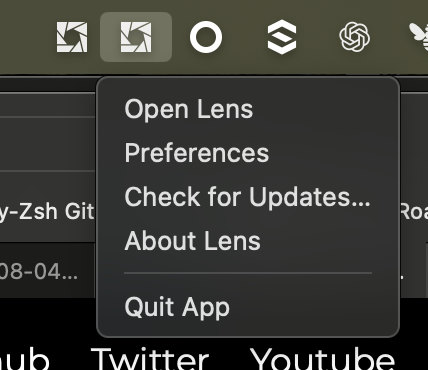
Reseting all the settings could help, this means deleting the directory (replace your username). Take a backup if you want to preserve your settings.
`/Users/yourusername/Library/Application Support/Lens`
Or same in Windows %AppData/Lens
---
### Author:  [@yeluri.krishnavamsi](https://forums.k8slens.dev/u/yeluri.krishnavamsi)
#### Post date: [August 4, 2025, 12:33pm UTC](https://forums.k8slens.dev/t/lens-stuck-in-loading-screen-in-mac/6261/8 "2025-08-04T12:33:34Z")
Deleting the Lens folder worked. Thank you so much.
Before deleting the settings, I tried to extract the errors from the developer console like you mentioned. But I was able to see only a black screen.