Hello,
I am using Lens Desktop to manage my Kubernetes clusters.
Previously, under:
Workloads → Horizontal Pod Autoscalers
there was a “Metrics” column that displayed the configured metrics for each HPA (e.g., CPU utilization, memory, custom metrics, etc.).
However, after upgrading to the latest version, the Metrics column no longer displays any data. The HPAs themselves are working correctly, and kubectl describe hpa shows the metrics as expected. The issue appears to be UI-related.
Environment
-
Lens Desktop Version: Latest
-
Kubernetes Version: 1.34.4
-
OS: Windows
-
HPA API Version: autoscaling/v2
What I Checked
-
kubectl get hpa -o yaml→ metrics are defined correctly -
kubectl describe hpa→ metrics are visible -
No errors in Lens UI logs
-
Issue reproducible across multiple clusters
Expected Behavior
The Metrics column should display configured HPA metrics as in previous versions.
Actual Behavior
The column is empty for all HPAs.
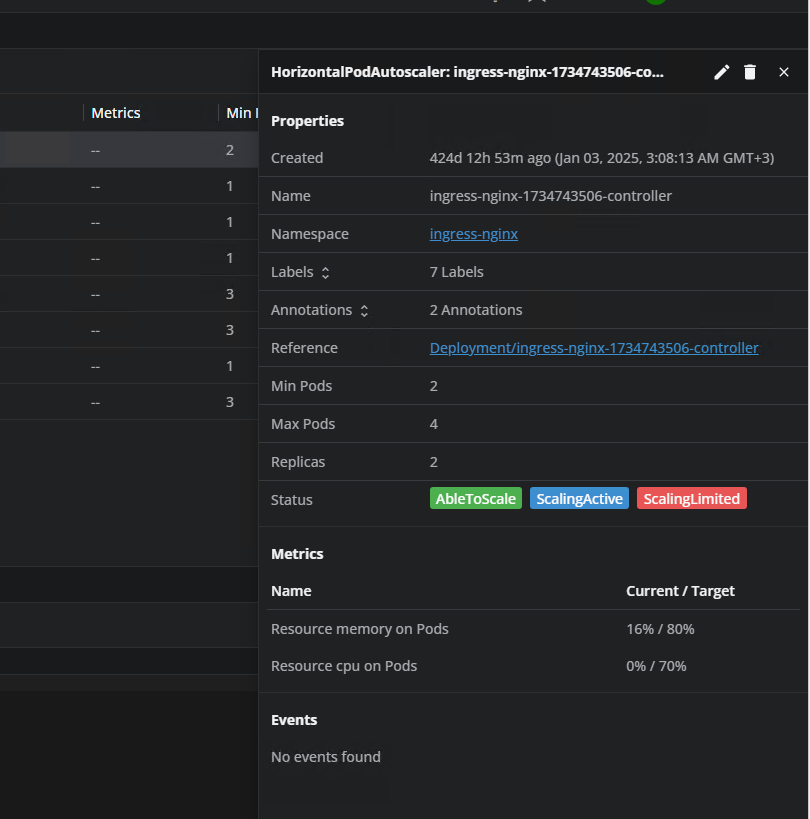
Has this feature been removed intentionally, or is this a known bug/regression?