The new Stable release of Lens Desktop is here.
To ensure a smooth transition and minimize disruption we’ll start by rolling out the update to a small portion of our users, then incrementally increasing this number until all users have access to the update. If you have not received the update and wish to try it out, you can download this version manually at our website.
Key Features
Lens Turbo
Lens just got a 20× speed boost. Huge clusters that used to crawl now fly. Resource lists load in a blink, tab switching is a breeze, and even clusters with tens of thousands of pods feel light.
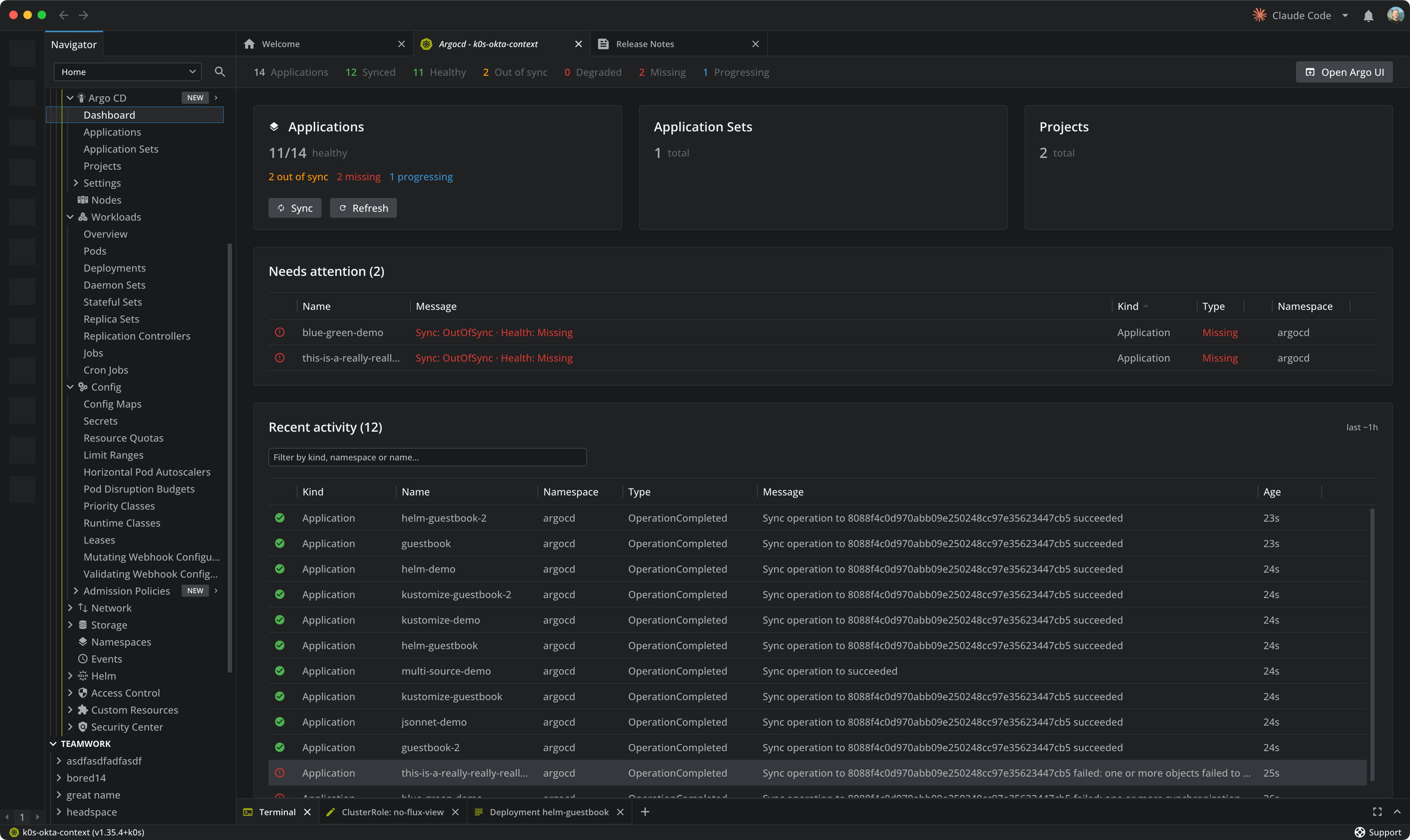
Argo CD support
Say hello to Argo CD in Lens. A new Argo CD section brings a combined Sync and Health dashboard plus list views and detail panels for Applications, Application Sets, Projects, Repositories and Clusters. Spot what needs attention in the “Needs attention” list, follow the live “Recent activity” feed, jump between an Application and the workloads it manages, Sync or Refresh in one click (in bulk or one at a time), open the Argo CD web UI instantly, and Ask AI about any resource. Argo CD is a premium feature.
Platform upgrade
Lens now runs on Electron 43, bringing Chromium 150 and Node.js 24 along with upstream stability and input-latency improvements.
Enhancements
- Cordoned nodes can now be found by searching “SchedulingDisabled”
- The node Conditions column now sorts by the displayed active conditions
- Faster Helm repository lookups thanks to chart index caching
- Clearer error message when manually triggering a CronJob fails
- Signing in to AKS clusters now shows an actionable error when the Azure token cannot be refreshed
Bug Fixes
- Lens no longer occasionally opens as a black window on startup
- Upgrading a Helm release now offers only versions from the release’s original repository
- The Helm Charts view no longer fails when Helm prints warnings, for example with certain Helm plugins installed
- Helm releases now refresh reliably while changes are in flight, and Lens no longer spawns excessive Helm processes when cluster Secrets change
- Terminal sessions are now closed cleanly when quitting Lens, fixing a crash on macOS
- Resource lists and pod logs now recover automatically after a connection interruption instead of freezing until the cluster is reconnected
- Workloads and Config are no longer hidden on Rancher-managed clusters where permissions cannot be fully enumerated
- Deep links (lens://) now open the correct view for every resource kind, not just Pods
- Cluster overview Pods Usage now reflects the selected node role, and requests and limits are scoped to the selected role as well
- The cluster overview CPU chart now renders on Prometheus Operator based setups, and chart legend colors match the charts
- Resource metrics charts now appear for running init and sidecar containers
- Selecting pod log text by dragging no longer extends outside the log area
- Numeric preference inputs no longer lose or corrupt values when committing changes
- The terminal Font Family dropdown options now render at standard size
- Keyboard shortcuts no longer trigger when the key event was already handled by another control
- Select dropdowns now clear their search text after a selection
- The port forward dialog no longer clips the local port field
- The namespace filter now recovers when previously selected namespaces are no longer allowed
- A downloaded update stays installable even if a later update check or download fails
- The Linux launcher now shows the correct icon and window manager class
- Shell environment synchronization no longer writes environment variables into log files
- Security updates for bundled dependencies